
Recently I wanted to demonstrate to some people on my training, how Oracle database maintains blocks in a datafile – what happens after truncate, truncate with drop storage clause, delete, regular insert, direct path insert and so on…
I didn’t find any tool for that so I’ve written my own. It’s core code is based on my previous database block research – project RICO https://blog.ora-600.pl/2015/09/03/rico/
Tool is very small and simple and right now it supports only regular blocks with data and no compression.
And this is how it works – let’s create a tablespace and 3 new tables in HR schema:
SQL> conn / as sysdba
Connected.
SQL> create tablespace emps_tbs
  2  datafile '/u01/app/oracle/oradata/orcl/emps_tbs01.dbf'
  3  size 64m
  4  autoextend on next 32m
  5  maxsize 1g;

Tablespace created.

SQL> conn hr/hr
Connected.
SQL> create table employees1 tablespace emps_tbs as select * from employees;

Table created.

SQL> create table employees2 tablespace emps_tbs as select * from employees;

Table created.

SQL> create table employees3 tablespace emps_tbs as select * from employees;

Table created.

SQL>
Now let’s fill those tables:
SQL> ed
Wrote file afiedt.buf

  1  begin
  2    for i in 1..50 loop
  3	 for j in 1..10 loop
  4	   insert into employees1 select * from employees;
  5	   insert into employees2 select * from employees;
  6	   insert into employees3 select * from employees;
  7	   commit;
  8	end loop;
  9    end loop;
 10* end;
SQL> /

PL/SQL procedure successfully completed.
Now let’s play with tables a little bit 🙂
To check the physical layout of blocks in a datafile we have get data_object_id of all tables:
[code]
SQL> ;
  1  select object_id, data_object_id, object_name
  2  from user_objects
  3* where object_name like 'EMPLOYEES_'
SQL> /

 OBJECT_ID DATA_OBJECT_ID OBJECT_NAME
---------- -------------- ------------------------------
     94033	    94033 EMPLOYEES3
     94032	    94032 EMPLOYEES2
     94031	    94031 EMPLOYEES1
Now we can prepare parameter file for my tool:
94031:X|RED
94032:Y|BLUE
94033:Z|MAGENTA
And this is how we use it (I use print screens to show you colors :))
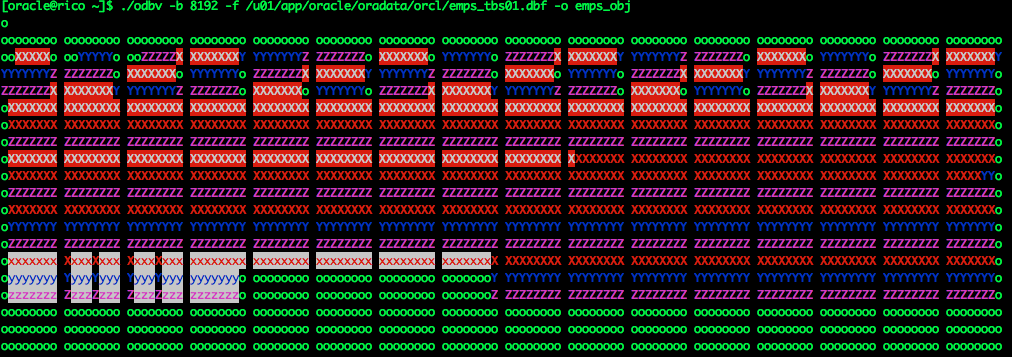
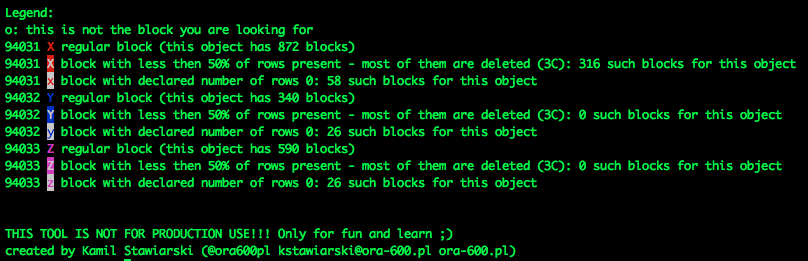
And below visualization you can find legend:
Well, that’s it. If you want to play with it, you can find this tool, compiled for Linux x86_64 here: http://ora-600.pl/oinstall/odbv.x86_64
I will use it in the future to explain some stuff 🙂 Enjoy!